The Problem
When a Kubernetes pod crashes and restarts, the clock starts ticking. You have roughly 1 hour before kubectl get events forgets it ever happened. Previous container logs? Gone after the next restart. OOMKill at 3 AM? Good luck debugging it on Monday.
Introducing Podmortem
Podmortem is a lightweight Kubernetes sidecar that watches for pod restarts in real-time and automatically captures the reason, last container logs, and events — storing them permanently in SQLite.
Key Features
- ⚡ Real-time pod restart detection via Kubernetes Watch API
- 📋 Captures previous container logs (the crashed container's output)
- 🔍 Records pod events at the exact moment of restart
- 💾 SQLite-backed searchable history — survives beyond K8s 1-hour TTL
- 🎯 Rich CLI with filtering by namespace, pod, time range
- 🗑️ Built-in purge command for housekeeping
- ☸️ Helm chart for one-command deployment
How It Works
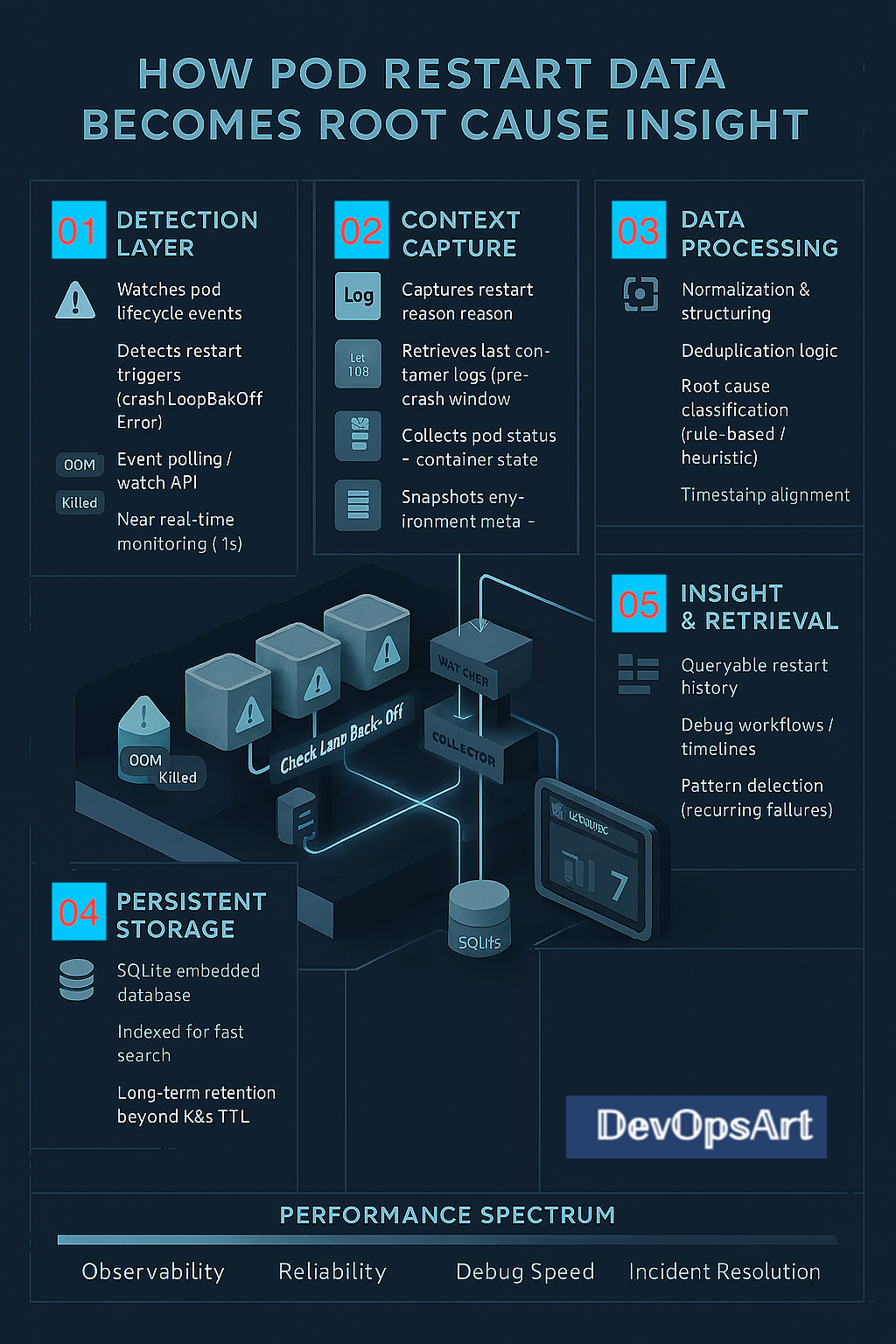
- Detection — Watches Kubernetes API for pod lifecycle events using the Watch API with near real-time monitoring (<1s delay)
- Context Capture — Grabs restart reason, previous container logs, pod status, and environment metadata
- Data Processing — Normalizes data, deduplicates, classifies root cause (OOMKill, CrashLoopBackOff, Error), aligns timestamps
- Persistent Storage — Stores in SQLite with indexing for fast queries and long-term retention
- Insight & Retrieval — Query restart history, build debug timelines, detect recurring failure patterns
Quick Start — Deploy with Helm
# Install to your cluster
helm install podmortem charts/podmortem \
  -n podmortem --create-namespace

# Verify it's running
kubectl get pods -n podmortem
Query Restart History
No local install needed — exec directly into the pod:
# Get pod name
POD=$(kubectl get pod -n podmortem \
  -l app.kubernetes.io/name=podmortem \
  -o jsonpath='{.items[0].metadata.name}')

# View recent restarts
kubectl exec -n podmortem $POD -- podmortem history

# Filter by namespace and pod
kubectl exec -n podmortem $POD -- podmortem history -n production -p my-app

# Full crash details with logs
kubectl exec -n podmortem $POD -- podmortem detail 1
Example Output
                Pod Restart History (3 records)
┏━━━━┳━━━━━━━━━━━━━━━━━━━━━┳━━━━━━━━━━━━┳━━━━━━━━━━━━━┳━━━━━━━━━┳━━━━━━━━━┓
┃ ID ┃ Timestamp           ┃ Namespace  ┃ Pod         ┃ Reason  ┃ Exit    ┃
┡━━━━╇━━━━━━━━━━━━━━━━━━━━━╇━━━━━━━━━━━━╇━━━━━━━━━━━━━╇━━━━━━━━━╇━━━━━━━━━┩
│  3 │ 2026-05-22T14:08:53 │ clares-ns  │ clares-pod  │ OOMKill │    137  │
│  2 │ 2026-05-22T14:03:46 │ clares-ns  │ clares-pod  │ OOMKill │    137  │
│  1 │ 2026-05-22T13:58:41 │ clares-ns  │ clares-pod  │ OOMKill │    137  │
└────┴─────────────────────┴────────────┴─────────────┴─────────┴─────────┘
Housekeeping with Purge
# Delete records older than a date
kubectl exec -n podmortem $POD -- podmortem purge --before "2026-05-01T00:00:00" -y

# Delete by namespace
kubectl exec -n podmortem $POD -- podmortem purge -n staging -y

# Wipe everything
kubectl exec -n podmortem $POD -- podmortem purge --all -y
Helm Configuration
| Parameter | Default | Description |
|---|---|---|
watchNamespace | "" (all) | Namespace to watch |
persistence.enabled | true | Enable PVC for SQLite |
persistence.size | 1Gi | Storage size |
resources.limits.memory | 256Mi | Memory limit |
verbose | true | Debug logging |
Why Podmortem?
| Without Podmortem | With Podmortem |
|---|---|
| Events expire after ~1 hour | Permanent searchable history |
| Previous logs lost on next restart | Logs captured at crash time |
Manual kubectl describe per pod | Aggregated view across all pods |
| No pattern visibility | Detect recurring failures |
Get It
🔗 GitHub: github.com/DevOpsArts/podmortem
🐳 Docker Hub: devopsart1/podmortem
Built by DevOpsArt — because every pod crash tells a story.
Post a Comment